> ## Documentation Index
> Fetch the complete documentation index at: https://docs.telepatia.ai/llms.txt
> Use this file to discover all available pages before exploring further.
# Examples
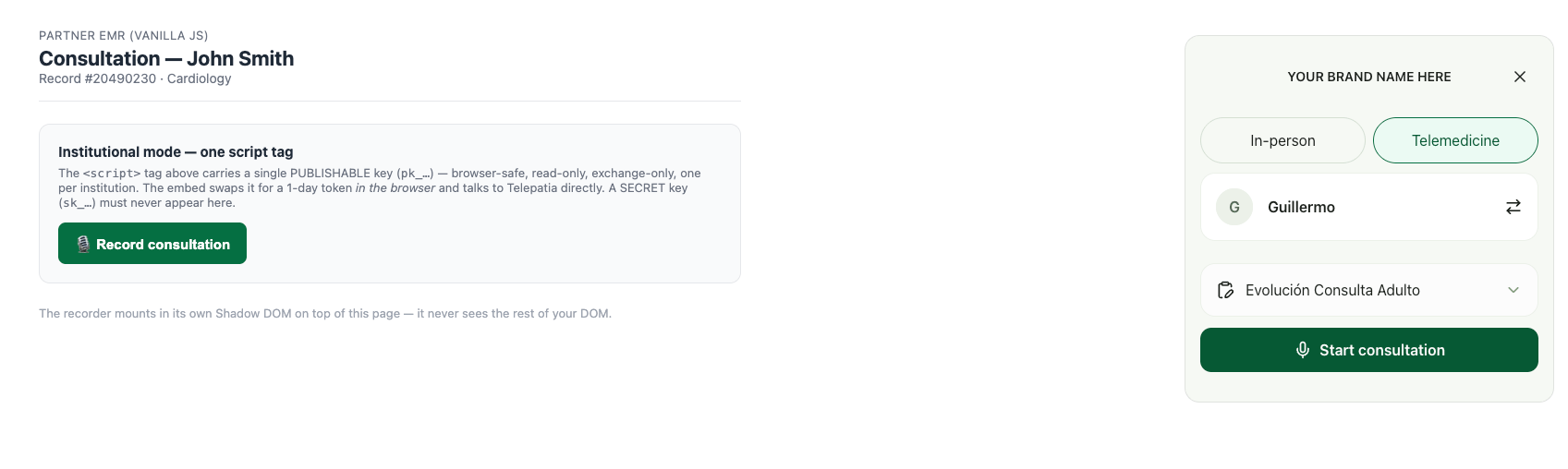
> A full page to copy, and what the panel looks like
## Full page
Copy it, swap `pk_…`, and serve it over `https` or `localhost`.
```html theme={null}
```
## What it looks like
## Build it with AI
Paste this into your coding agent (Claude Code, Cursor, v0…). It reads the CDN
and builds the page:
```text theme={null}
Build a minimal Telepatia Embed integration on a static page.
1. Read the CDN to confirm the current bundle version:
- https://cdn.telepatia.ai/telepatia-embed/v0/embed.js
- https://cdn.telepatia.ai/telepatia-embed/update-manifest.json
2. Create index.html that:
- sets window.TelepatiaRecorderConfig = { apiKey: "", locale: "en" }
BEFORE the embed
 ## Build it with AI
Paste this into your coding agent (Claude Code, Cursor, v0…). It reads the CDN
and builds the page:
```text theme={null}
Build a minimal Telepatia Embed integration on a static page.
1. Read the CDN to confirm the current bundle version:
- https://cdn.telepatia.ai/telepatia-embed/v0/embed.js
- https://cdn.telepatia.ai/telepatia-embed/update-manifest.json
2. Create index.html that:
- sets window.TelepatiaRecorderConfig = { apiKey: "
## Build it with AI
Paste this into your coding agent (Claude Code, Cursor, v0…). It reads the CDN
and builds the page:
```text theme={null}
Build a minimal Telepatia Embed integration on a static page.
1. Read the CDN to confirm the current bundle version:
- https://cdn.telepatia.ai/telepatia-embed/v0/embed.js
- https://cdn.telepatia.ai/telepatia-embed/update-manifest.json
2. Create index.html that:
- sets window.TelepatiaRecorderConfig = { apiKey: "